Syntaxor
Echo Module
Echo Module
Couldn't load pickup availability
Self-paced learning overview
- 📁 Downloadable digital materials
- 📚 Study offline after download
- 🔒 Secure checkout
- 🗓️ Content updated in 2026
1. Problem Statement
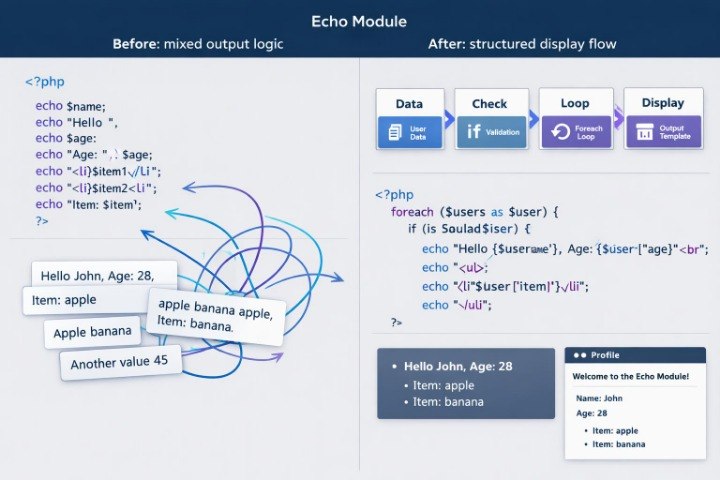
Struggling to understand how PHP code turns data into visible output? You’re not alone, because after learning basic syntax many learners face the question of how variables, conditions, loops, and arrays work together in real code fragments. Each topic may seem understandable on its own, but confusion can appear when they are combined in one example. A learner may know what a variable or array is, yet not always see how to prepare, check, and display that data correctly. Echo Module is created for careful work with these transitions between logic and display.
2. Solution
This course will teach you how to connect PHP data handling with clear output logic through organized examples and practice tasks. Echo Module focuses on how data is created, changed, checked, and passed into the display part. The learner reviews common examples where variables, conditions, loops, arrays, and functions work together rather than separately. The materials help learners read these fragments calmly, without sudden jumps into complex topics. This plan works as a next step after a foundational route, when the learner wants to better see the connection between code and the result on a page.
3. What’s Inside
- Module 1: Output Logic Basics — the learner explores how PHP forms data output, how simple output instructions work, and why it is helpful to separate logic from display. The module shows how to read fragments where values move from code into a text or structure block.
- Module 2: Variables in Output — work with variables used for displaying text, numbers, and simple values. The learner sees how to prepare data before output and how to avoid scattered value mixing in examples.
- Module 3: Conditions Before Display — an explanation of how conditions help decide what should be shown in a certain situation. The module reviews value checks, alternative messages, and simple display control scenarios.
- Module 4: Arrays for Repeated Blocks — an introduction to using arrays for repeated elements. The learner studies how to store multiple values, move through them, and create similar blocks without unnecessary duplication.
- Module 5: Loops and List Rendering — practical work with loops for forming lists, cards, rows, or repeated structures. The module explains how a loop takes data from an array and turns it into organized display.
- Module 6: Functions for Display Helpers — creating small functions that help prepare text, format values, or reuse part of the logic. The learner sees how functions make examples cleaner and easier to read.
- Module 7: Template Thinking — an introduction to template thinking: what belongs to logic, what belongs to structure, and what belongs to repeated blocks. The module helps learners look more carefully at page and example construction.
- Module 8: Mini Output Scenarios — a set of short practical scenarios where variables, conditions, arrays, loops, and functions are combined. The tasks are created for review and gradual strengthening of understanding.
4. Who Is This For?
✅ A good fit if you:
- already understand basic PHP programming syntax;
- want to better see the connection between data and display;
- have worked with variables, conditions, loops, and arrays but want more practice;
- want to learn how to read examples where several topics are combined;
- are looking for a plan focused on data output and simple template logic;
- study independently and are ready to carefully review code fragments.
❌ Not a fit if you:
- are not yet familiar with basic variables, conditions, and loops;
- are looking for a very short introduction without practical scenarios;
- expect materials about complex architecture;
- do not plan to read and analyze code examples;
- are looking for claims about jobs, clients, or financial results;
- want learning without independent exercises.
5. What You’ll Learn
- Understand how PHP forms data output.
- Work with variables in a display context.
- Prepare simple values before displaying them.
- Use conditions to control what appears.
- Create alternative messages based on values.
- Use arrays for repeated blocks.
- Read loops that form lists or cards.
- Combine arrays and loops in one scenario.
- Create small functions for data preparation.
- Separate logic, structure, and repeated elements.
- Analyze code fragments where several topics work together.
- Complete practical scenarios with data output.
- Navigate PHP programming template thinking more clearly.
6. 30-Day Return Review
The Echo Module plan may include a 30-day return request review period according to Syntaxor store rules. The terms depend on the material format, course usage status, and current service policy. Before placing an order, we recommend carefully reviewing the purchase terms page and material usage rules. If questions appear about the included materials, difficulty level, or learning format, the Syntaxor team can provide explanations through the contact form.
Who are Syntaxor courses created for?
Who are Syntaxor courses created for?
Syntaxor courses are created for people who want to study PHP programming through structured materials, examples, and practical tasks. They are suitable for independent study, review of basic topics, and gradual work with server-side logic. Each plan has its own material scope, so learners can choose a format that matches their current level.
What is included in Syntaxor plans?
What is included in Syntaxor plans?
The plans may include lessons, text materials, code examples, practice tasks, diagrams, checklists, and independent exercises. The exact content depends on the selected plan. All materials are built around PHP programming, code logic, file structure, data handling, and practical thinking.
Share